Mirror Suite · AMS Studio · Luxembourg

Your folders, always up to date. In the background, without a subscription.

A source folder, a destination — external drive, network share, FTP server or S3 storage — and SyncMirror keeps the two identical, in real time, without you thinking about it. Nothing is deleted without a safety net.

Verified publisher AMS STUDIO S.à.r.l. Windows 10 and 11 Your files never pass through our servers Perpetual licence
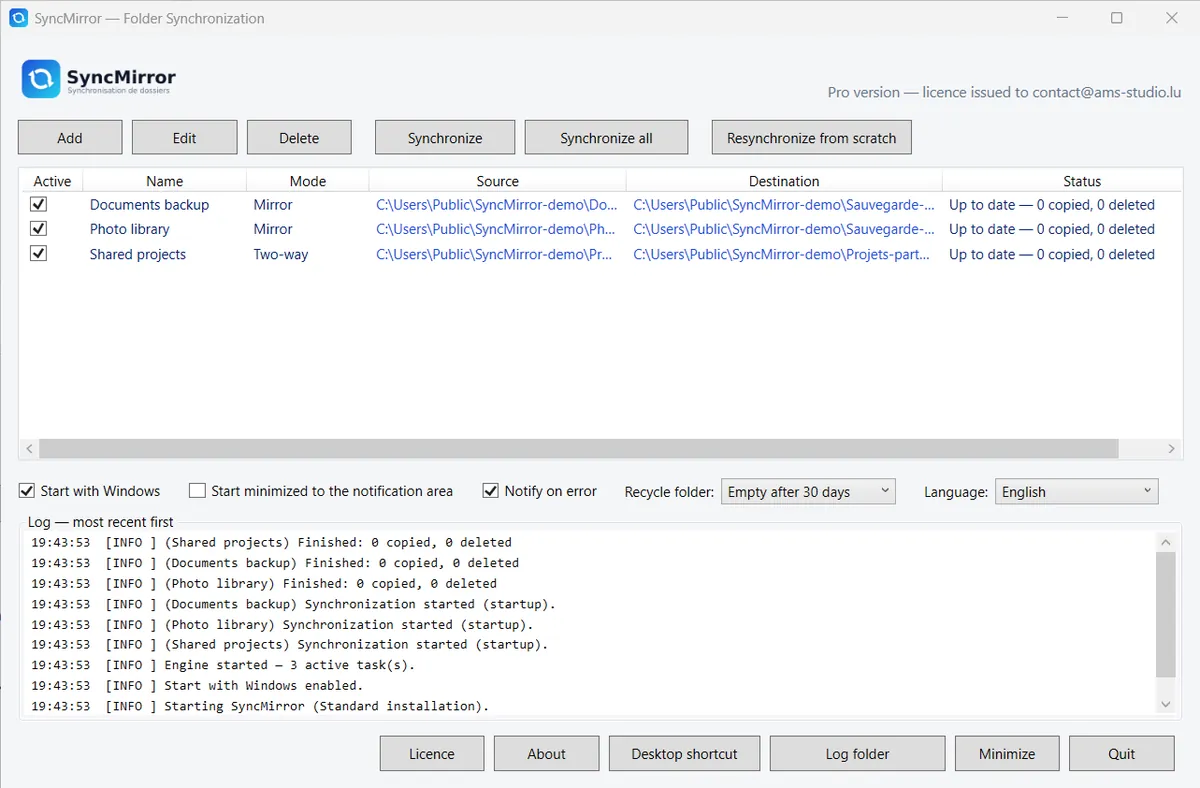
The main SyncMirror window: the tasks, their state, and the log of the latest synchronisations
The main window: your tasks, their state, and the log of the latest synchronisations.
Two modesDestinationsReal timeThe safety netSecurity

What SyncMirror does

A task is a source, a destination and a mode. It takes care of the rest.

SyncMirror runs in the notification area, detects what changes and copies it. You work in your folders as usual.

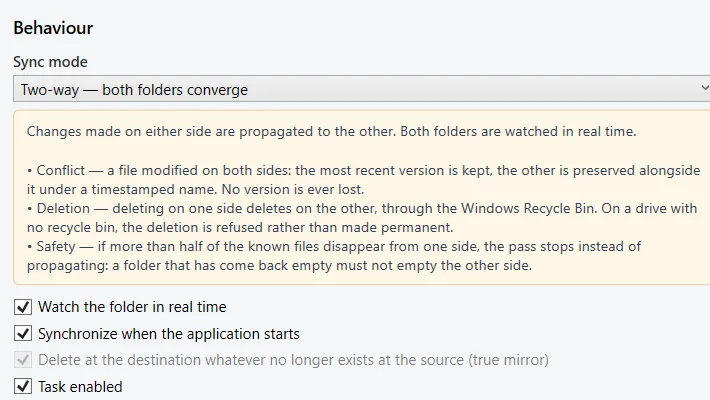
Choosing a task's mode: mirror or two-way, each explained
Each mode explains what it does before you choose it.

Two modes

Mirror, or two-way — depending on what you want.

  • Mirror: the destination becomes an exact copy of the source. What disappears on one side disappears on the other — backing up a PC to a disk or a NAS.
  • Two-way: both sides converge. A file added or changed on one side reaches the other, whichever side you worked on — two PCs, one shared folder.
  • Several tasks at once, each with its own mode, destination and pace.
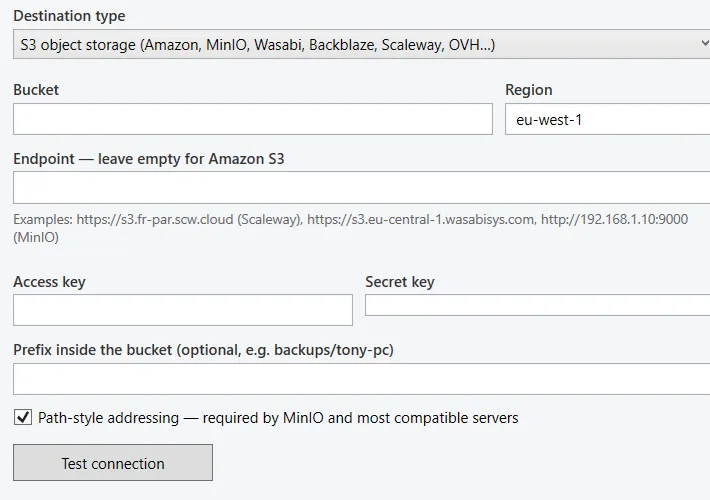
Setting up an S3 destination in SyncMirror, with the connection test button
Setting up an S3 destination, with a connection test before saving.

Destinations

A disk, a share, an FTP server, S3 storage: whichever destination you want.

  • Local and network: a folder, an external drive, a network share, an already synchronised cloud folder.
  • FTP, FTPS, SFTP: your web host or your server.
  • Any S3-compatible storage: Amazon S3, Wasabi, Backblaze B2, Scaleway, MinIO, iDrive e2.
  • A connection test before saving: you know right away whether the credentials work.
Quote_DV-2026-0388.docx savedcopied 3 s later
Site_photos › 14 files addeduploaded in the background
SFTP destination re-readevery 15 min — an interval you set
SyncMirrorin the notification area, no window open

Real time

A saved file leaves a few seconds later.

  • Changes are detected on the fly, with no schedule to set.
  • A remote destination, which cannot report its own changes, is re-read at the interval you set.
  • A log says what was copied, when, and what caused trouble.
Old_quote.docx deleted on the destination sidemoved to the dated recycle bin
Recycle bin .syncmirror-corbeille › 2026-09-14kept 30 days
Schedule.xlsx changed on both sidesconflict reported, nothing decided silently
1,240 deletions detected at oncetask paused — confirmation requested

The safety net

Nothing is deleted without a safety net.

  • A dated recycle bin on the destination side: a deleted or replaced file goes there first, and you keep it 7, 15 or 30 days — or indefinitely.
  • Conflicts are reported rather than decided silently.
  • An unexpected mass deletion pauses the task and asks for your confirmation before going further — an unplugged disk does not empty your NAS.
FTP / SFTP passwords, S3 keysencrypted by Windows (DPAPI), bound to your session
Your filesPC ↔ destination, never through us
Telemetry, trackers, advertisingnone
Installer and applicationsigned AMS STUDIO S.à.r.l.

Security

Your credentials stay with you.

  • FTP/SFTP passwords and S3 keys are encrypted on your PC by Windows, bound to your user account.
  • Your files never pass through our servers: they go from your PC to your destination.
  • No telemetry, no trackers, no advertising, no account to create.

Why SyncMirror

Four reasons to prefer it to a script or a subscription.

1×

Once, for good

Perpetual Pro licence, usable on your PCs. No subscription, no account, no feature that vanishes when you stop paying.

0

Files lost silently

Dated recycle bin, reported conflicts, blocked mass deletion: SyncMirror would rather ask you than guess.

S3

To the storage of your choice

Disk, NAS, FTP, SFTP or any S3-compatible storage — no resold space, no middleman.

S.à.r.l.

A publisher with a name

Application and installer signed in the name of AMS STUDIO S.à.r.l., Luxembourg. Verified updates, and a human who replies at contact@ams-studio.lu.

Pricing

Free for one task. Pro for all the others.

Free

0 €

  • One synchronisation task, with no time limit.
  • Source folder up to 2 GB.
  • Every destination: disk, network, FTP, SFTP, S3.
Download

Pro

€29incl. VAT · once

  • Unlimited tasks, no size limit.
  • Perpetual: updates included, no expiry; usable on your PCs.
  • Verified offline: no account, no permanent connection. The licence arrives by e-mail as soon as you pay.
Buy the Pro licence

Team

On quote

  • Several PCs in the same organisation, a single invoice.
  • Write to us with the number of PCs: contact@ams-studio.lu.
Request a quote

Price inclusive of VAT for EU consumers; businesses enter their intra-community VAT number at payment for a VAT-free invoice. Payment by card, processed by Stripe; the licence arrives by e-mail as soon as payment is confirmed. A lost licence file is resent from the “Recover my licence” page.

The Mirror Suite

SyncMirror has two siblings. Same house, same rule: one licence, no subscription.

Three Windows applications by AMS Studio, Luxembourg, built for freelancers and small teams who want tools they actually own.

FAQ

What people ask us before buying.

Is the free version time-limited?

No. It is limited to one synchronisation task and a 2 GB source folder, with no expiry.

Is my licence tied to one machine?

No. It is perpetual and usable on your PCs. Keep the licence file received by e-mail; if it is lost, the “Recover my licence” page resends it to the address used at purchase.

What happens to a deleted file?

In two-way mode it is never erased: it is moved into a dated .syncmirror-corbeille folder at the root of the side concerned, kept for as long as you chose.

Do my files pass through your servers?

No. They go straight from your PC to your destination — disk, share, FTP server or S3 provider. We never see their content.

What language is the application in?

It follows Windows by default; a selector in the main window lets you force the language, taking effect on restart.